Top CRM Automations for Small Businesses
Managing leads and customer relationships manually might work when your business is small, but it becomes harder to maintain as you grow.
Enquiries start coming from your website, social media, forms, campaigns, referrals, and outbound outreach. Conversations happen across different channels. Follow-ups get delayed. Leads sit untouched. And before long, opportunities are being lost simply because there is no system connecting everything together.
That is where CRM automation changes the way a business operates.
At Lifestyle Industries, we focus on building connected marketing systems that turn visibility into automated leads, recurring revenue, and scalable growth. Combined with intelligent lead generation systems like Pro Lead Sniper, businesses can automate much more than administration—they can create a connected system that finds opportunities, captures them, nurtures them, and moves them toward a sale.
A CRM, or Customer Relationship Management system, becomes the central hub behind that process.
In this guide, we’ll break down the most valuable CRM automations for small businesses and how they can help create a more consistent flow from lead generation → conversation → appointment → sale → customer.
What Is CRM Automation?
CRM automation refers to using software to automate tasks related to customer management, sales processes, communication, and lead nurturing.
Instead of manually handling every customer interaction, CRM systems can automatically:
send follow-up emails
assign leads
update customer records
trigger reminders
move deals through pipelines
schedule appointments
track customer activity
The goal is reducing repetitive admin work while improving consistency and organisation.
Why CRM Automation Matters for Small Businesses
Small businesses often operate with limited time, staff, and resources.
Without systems in place, important tasks can become overwhelming quickly.
CRM automation helps businesses:
save time
improve follow-up consistency
reduce human error
organise customer data
improve response times
increase sales efficiency
create smoother customer experiences
Automation allows small teams to operate more efficiently without needing large support staff.
Automated Lead Capture
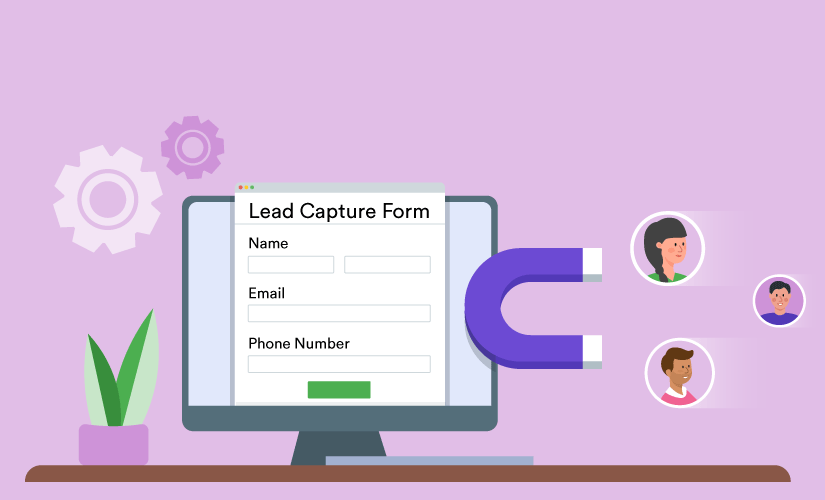
One of the most useful CRM automations is automatic lead capture.
Instead of manually entering enquiries into a system, CRM platforms can automatically collect and organise lead information from:
website forms
landing pages
Facebook Lead Ads
chatbots
booking forms
email enquiries
Once submitted, the lead is instantly added to the CRM with their details stored automatically.
This prevents lost leads and keeps pipelines organised from the beginning.
Instant Lead Response Automation
Speed plays a major role in lead conversion.
When businesses delay responses, leads often move on to competitors.
CRM systems can automatically send:
welcome emails
SMS confirmations
enquiry acknowledgements
booking instructions
resource downloads
immediately after a lead submits a form.
This creates a faster and more professional customer experience.
Automated Lead Assignment
As businesses grow, manually assigning leads becomes inefficient.
CRM automation can automatically distribute leads based on:
location
service requested
team availability
lead source
deal size
This ensures enquiries reach the right team member quickly without requiring manual coordination.
Pipeline Stage Automation
Sales pipelines become difficult to manage manually when lead volume increases.
CRM automations can automatically move leads between stages based on actions or behaviours.
For example:
booking a call moves a lead into the consultation stage
signing a proposal updates the deal status
making a payment moves the customer into onboarding
This keeps sales pipelines accurate without requiring constant manual updates.
Automated Follow-Up Sequences
Many businesses lose sales simply because follow-up is inconsistent.
CRM systems can automate follow-up sequences through:
email campaigns
SMS reminders
appointment confirmations
nurture sequences
re-engagement campaigns
These workflows help businesses stay connected with leads without manually messaging every prospect.
Strong follow-up systems often improve conversion rates significantly.
Appointment Reminder Automation
Missed appointments can waste time and reduce revenue.
CRM automation can reduce no-shows through automatic:
SMS reminders
email reminders
calendar confirmations
rescheduling links
Reminder workflows help improve attendance while reducing manual admin work.
Customer Onboarding Automation
The onboarding experience heavily influences customer satisfaction.
CRM systems can automate onboarding tasks such as:
welcome emails
onboarding instructions
document delivery
training resources
account setup steps
progress tracking
A structured onboarding process helps customers feel supported from the beginning.
Task and Notification Automation
CRM platforms can automatically create tasks and reminders for team members.
Examples include:
follow-up call reminders
overdue deal notifications
appointment alerts
customer renewal reminders
internal task assignments
This reduces the risk of forgotten tasks and improves accountability across teams.
Review and Feedback Automation
Customer reviews are important for credibility and local visibility.
CRM systems can automatically request reviews after:
completed services
purchases
appointments
successful customer interactions
Businesses can automate:
Google review requests
feedback surveys
testimonial collection
satisfaction check-ins
This helps generate reviews consistently without manual follow-up.
Reactivation Campaign Automation
Many businesses focus heavily on new leads while ignoring inactive customers.
CRM automations can re-engage previous leads or customers through:
special offers
reminder emails
promotional campaigns
seasonal messages
personalised follow-ups
Reactivation campaigns can generate additional revenue from existing contacts.
Reporting and Analytics Automation
Manual reporting can become time-consuming quickly.
CRM systems can automatically generate:
sales reports
conversion tracking
lead source analysis
revenue dashboards
team performance reports
Automated reporting helps businesses make better decisions using real-time data.
Common CRM Automation Mistakes
Automation can improve efficiency significantly, but poor implementation often creates problems.
Common mistakes include:
over-automating communication
sending generic messages
creating overly complicated workflows
failing to update pipelines properly
neglecting personal interaction
poor customer segmentation
Automation should support customer relationships, not make interactions feel robotic.
How to Start With CRM Automation
Many small businesses try to automate everything immediately.
That often creates unnecessary complexity.
A better approach is starting with high-impact tasks such as:
lead capture
follow-up automation
appointment reminders
pipeline management
Once these systems work consistently, additional automations can be added gradually.
Simple workflows usually outperform complicated systems that become difficult to manage.
The Future of CRM Automation
CRM automation is increasingly powered by AI and predictive technology.
Businesses are beginning to use AI for:
lead scoring
personalised messaging
customer behaviour analysis
automated conversations
predictive sales forecasting
As automation technology improves, CRM systems will become even more efficient at managing customer relationships and sales processes.
Final Thoughts
CRM automation helps small businesses operate more efficiently by reducing repetitive tasks, improving organisation, and streamlining customer communication.
The most effective CRM systems are not necessarily the most complicated ones.
They are the systems that:
improve response times
simplify workflows
organise customer data
support consistent follow-up
create better customer experiences
For small businesses, even a few simple automations can save significant time while improving conversions and operational efficiency.
Start with essential workflows first, then expand gradually as your business grows.